
This is a quick guide to ease your pain using eBay as it descends into the later stages of enshittification in what can only be described as a sign of the times. If you, like me, find this obnoxious, unwanted, and repeatedly frustrating given there is no option to turn it off, this guide is for you. It takes about a minute and in most cases, is permanent.
I’ll keep this post navigable so use the headings to navigate if you don’t want to read a particular section. I’m going to write about what eBay live is, why you might want to remove it, how to remove it, and how it may come back and what to do if it does.
What is eBay Live?
eBay Live is an atrocious ‘feature’ rolled out by eBay whereby they pollute their homepage with tacky AI-generated thumbnails serving pointless live streams where people you don’t know sell rubbish you neither want nor need. It is typically featured prominently on the homepage and repeatedly, getting in the way of your recommendations and past searches, interrupting your browsing experience. It’s a prime example of a website failing to correctly understand what users want, and then to serve that.

Why You Probably Want to Disable eBay Live:
The problem with eBay Live, aside from its mere existence, is that it is fundamentally an assault on the user. It slows you down browsing your homepage because many sections now contain content that is not useful or interesting to you.
For people on limited mobile data plans, these videos are a worthless drain on your allowance.
They make the page heavier, and slower to load, and for no obvious benefit.
And perhaps worst for eBay, they annoy people, and this annoyance stops them doing what eBay should want – scrolling the platform recommendations buying stuff.
The worst of it is that there is no setting to turn it off either, so they’ve forced this inconvenience on you and there’s nothing you can do about it… or is there?
How to Disable eBay Live:
You can disable these silly video feeds. For this, you need a browser that supports uBlock Origin. You can read about uBlock Origin here, or download it here for Mozilla Firefox, Microsoft Edge, or Google Chrome. I personally recommend Firefox (or a Firefox fork like Waterfox, Librefox, or Zen) for your browser but as this isn’t a browser guide, I’ll leave it at that for now and perhaps address this in a new post later.
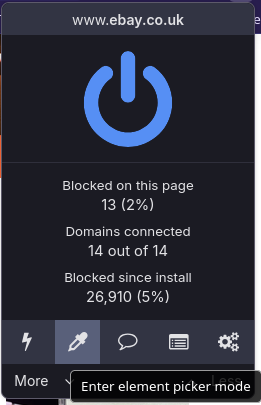
Next, open uBlock Origin and select the “element picker mode”, highlighted in the screenshot below.
This will allow you to select the offending section of the eBay homepage, like this:
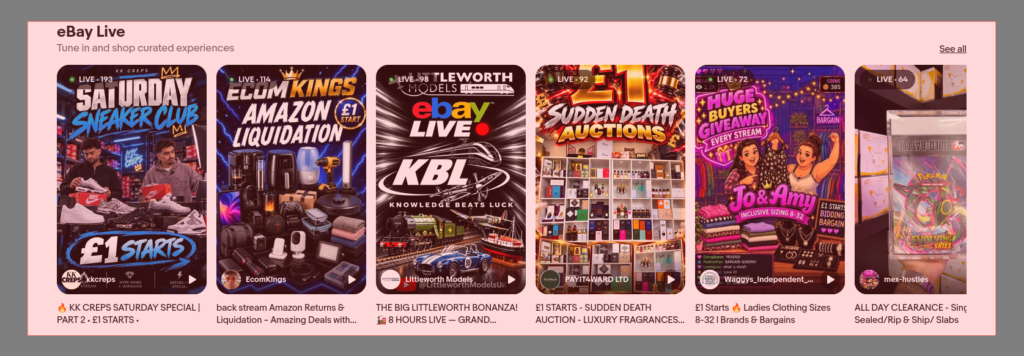
When you’re doing this, make sure to select the container that has all the rubbish in it – the heading, and the video feeds. If you hover over the individual feeds you’ll probably only take one of them out, and be left with the rest. Likewise if you go too wide you’ll delete the whole homepage. You can see what’s being selected by observing the red shaded box, like you can see in this screenshot.
When you’ve made your selection, click to confirm it. It should then show something like this:
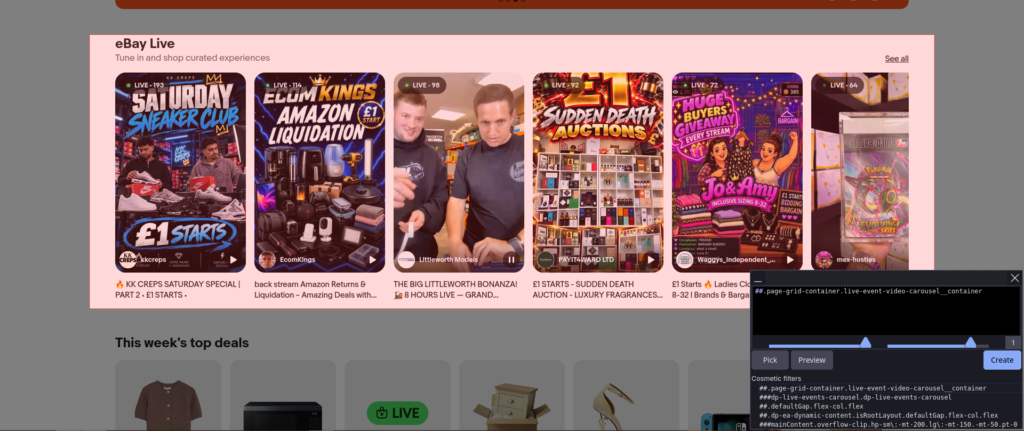
You’ll know you’ve got the right bit if we zoom in on that grey box in the right corner.
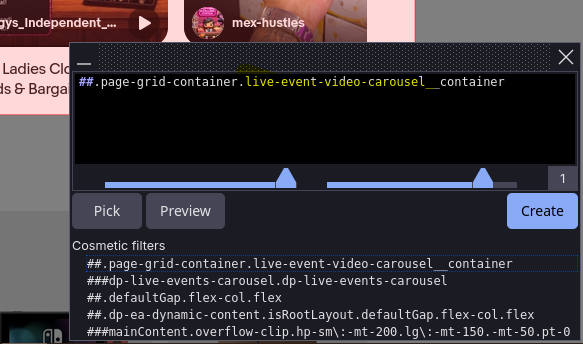
You can see the highlighted yellow text there identifies the live event video carousel container – that’s the part of the website serving you these rubbish videos.
If you scroll down the page, if you’ve done this right, you’ll see the other carousels are also highlighted in that red overlay from before. This confirms they will be deleted as well.
Next, just click “create”, and your homepage should immediately return to how it was before eBay ruined it! And that’s it. Enjoy!
An Aside on Browsers and Adblockers:
Statistically, many of you will be using Google Chrome, which is a bad choice for this as Google (being foremost an advertising company itself) is at war with ad blockers, and trying to cripple their effectiveness on its own platforms.
At the time of writing, it looks like Microsoft are joining the fight for an ad-riddled internet too.

As mentioned, I use Firefox, but other browsers are available. If it doesn’t work on Chrome or Edge you might want to give these more privacy-respecting browsers a try!
How eBay Live May Come Back & What To Do If It Does:
eBay may break this ‘fix’ we’ve used to improve their platform. They clearly want us to watch these videos or else they wouldn’t keep forcing them on us.
If they do, they won’t (probably) break your ad-blocker, they’re not powerful enough for that – they can’t stop your extensions running in your browser. What’ll likely happen is they will change the name of that container, so your rule doesn’t recognise it anymore. For example, maybe they change it from “live event video carousel container” to “the best idea we’ve ever come up with to annoy our users container”.
In such an event, simply repeat the process as outlined above. Bookmark this page if you like so you can come back to it in case that happens!
It’ll take eBay more time and money to keep dodging our blocks than it will take you to re-block them, so I wouldn’t expect them to really keep trying to do this. It’ll probably be a once-and-done thing, and you can go back to using the platform like you want to – not like they want you to.
Closing Remarks:
Thank you for taking the time to read this and I hope it helped. True North Web Design is a solo, freelance web design and development studio run by me, Jack, and it’s passionately committed to the values of ownership, privacy, and making things that serve the humans who use them.
If you ever have any website needs – a blog, a landing page, a creative portfolio, a brochure, or anything else – I’m only a message away. I specialise in WordPress and am always looking forward to helping you with your next project! I work with individuals and businesses, and offer site management and hosting services as well. You can see my past work here, and if you’re interested in a chat, just reach out!